> ## Documentation Index
> Fetch the complete documentation index at: https://asapp-04-04-getting-started-ga.mintlify.site/llms.txt
> Use this file to discover all available pages before exploring further.
# Building a GenerativeAgent
> Learn how GenerativeAgent works and the key components you'll configure.
Building a GenerativeAgent means configuring an agent that can handle customer conversations by understanding their needs, accessing relevant information, and taking appropriate actions.
## How GenerativeAgent Works
Unlike traditional bots with predefined flows, GenerativeAgent uses natural language processing to understand and respond to a wide range of customer queries and issues.
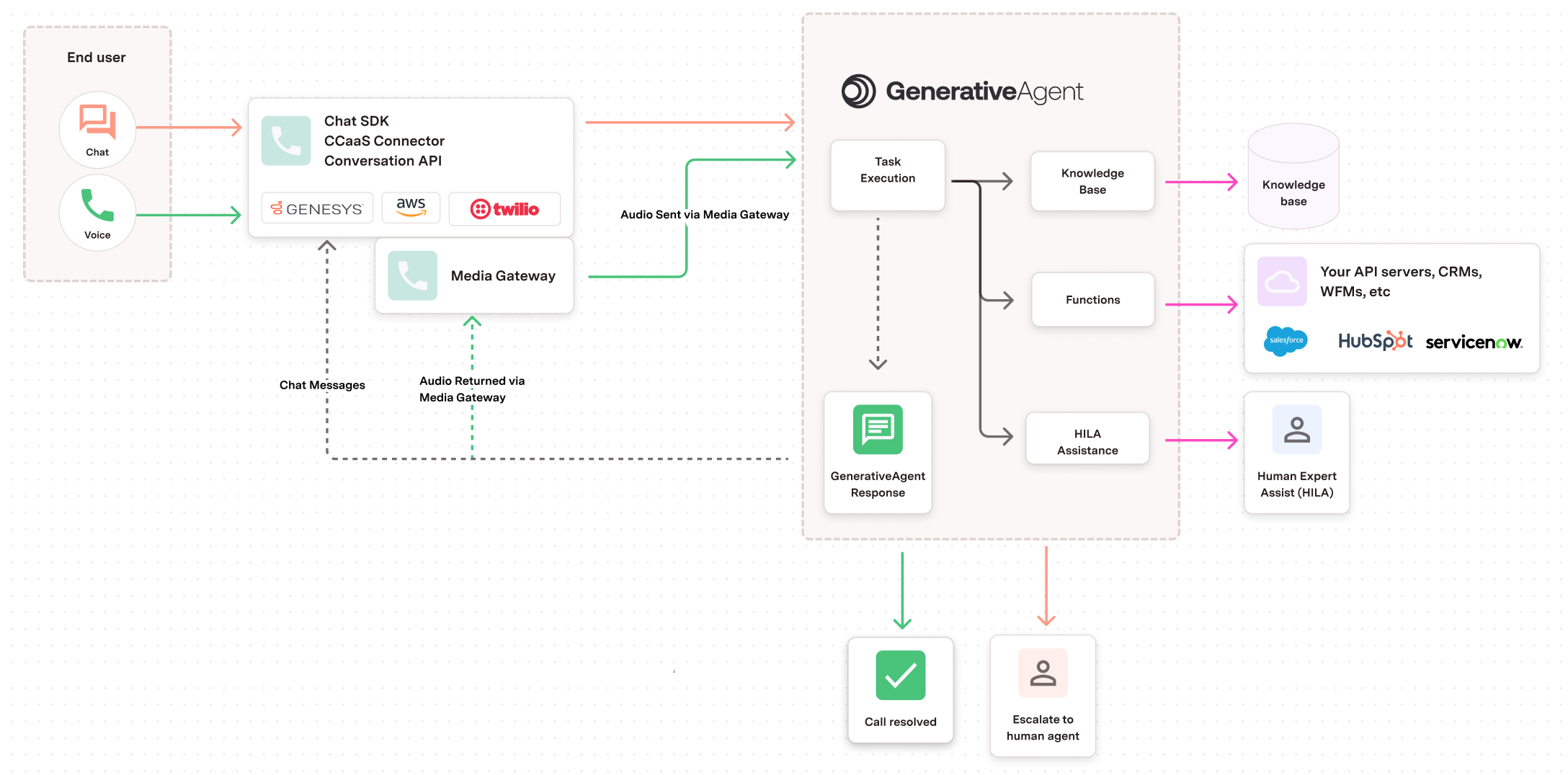 When a customer sends a message or speaks, it reaches GenerativeAgent through a connector or API integration.
GenerativeAgent searches it's local copy of your knowledge base for relevant information and adds it to the conversation context.
At every conversation turn, our Knowledge Base service will select the most relevant articles and add them to the conversation context.
We sync to your knowledge base at regular intervals, according to your configuration.
GenerativeAgent identifies the appropriate task based on the customer's needs and executes the task instructions by choosing one of several actions:
* **Use a Function**: Call your APIs to retrieve data or perform actions (may make multiple function calls). Functions can also perform local logic, data manipulation, and variable setting.
* **Request Human Help**: Escalate to a human agent when needed
* **Change Task**: Switch to a different task if the conversation direction changes
GenerativeAgent generates a human-like response to communicate with the customer.
This process continues in a loop until either:
* The **conversation is resolved** and GenerativeAgent hands control back to your system
* GenerativeAgent can't help further and **escalates to a human agent**
## Key Components You'll Configure
### Tasks
Define the specific issues or actions you want GenerativeAgent to handle. Each task includes:
* Clear instructions in human language
* Associated functions for performing actions
* Knowledge base filtering for relevant information
### Functions
Connect GenerativeAgent to your APIs so it can:
* Retrieve customer data
* Perform actions (refunds, account updates, etc.)
* Store conversation variables
* Transfer control to other systems
As part of function configuration, you will create [Backend System Integrations](/generativeagent/integrate) to connect to your APIs.
### Knowledge Base
Filter and connect your existing knowledge base so GenerativeAgent can:
* Access relevant articles for each task
* Use metadata to find the right information
* Provide accurate, up-to-date responses
## Understanding Environments
GenerativeAgent operates across three environments to ensure safe testing and deployment. As you refine your tasks, functions, and knowledge base, you'll deploy them through this progression:
* **Draft**: Test and configure your agent components before deployment
* **Sandbox**: Staging environment to validate agent behavior and responses
* **Production**: Live environment where your agent handles real customer conversations
You'll typically start by configuring and testing in Draft, then deploy to Sandbox for validation, and finally promote to Production once everything is working correctly.
Learn more about [deploying to GenerativeAgent](/generativeagent/configuring/deploying-to-generativeagent) for detailed deployment procedures.
## Next Steps
Learn how to add and configure use cases for your GenerativeAgent
Learn how to build your first GenerativeAgent that can use your KnowledgeBase to start answering your users' questions.
When a customer sends a message or speaks, it reaches GenerativeAgent through a connector or API integration.
GenerativeAgent searches it's local copy of your knowledge base for relevant information and adds it to the conversation context.
At every conversation turn, our Knowledge Base service will select the most relevant articles and add them to the conversation context.
We sync to your knowledge base at regular intervals, according to your configuration.
GenerativeAgent identifies the appropriate task based on the customer's needs and executes the task instructions by choosing one of several actions:
* **Use a Function**: Call your APIs to retrieve data or perform actions (may make multiple function calls). Functions can also perform local logic, data manipulation, and variable setting.
* **Request Human Help**: Escalate to a human agent when needed
* **Change Task**: Switch to a different task if the conversation direction changes
GenerativeAgent generates a human-like response to communicate with the customer.
This process continues in a loop until either:
* The **conversation is resolved** and GenerativeAgent hands control back to your system
* GenerativeAgent can't help further and **escalates to a human agent**
## Key Components You'll Configure
### Tasks
Define the specific issues or actions you want GenerativeAgent to handle. Each task includes:
* Clear instructions in human language
* Associated functions for performing actions
* Knowledge base filtering for relevant information
### Functions
Connect GenerativeAgent to your APIs so it can:
* Retrieve customer data
* Perform actions (refunds, account updates, etc.)
* Store conversation variables
* Transfer control to other systems
As part of function configuration, you will create [Backend System Integrations](/generativeagent/integrate) to connect to your APIs.
### Knowledge Base
Filter and connect your existing knowledge base so GenerativeAgent can:
* Access relevant articles for each task
* Use metadata to find the right information
* Provide accurate, up-to-date responses
## Understanding Environments
GenerativeAgent operates across three environments to ensure safe testing and deployment. As you refine your tasks, functions, and knowledge base, you'll deploy them through this progression:
* **Draft**: Test and configure your agent components before deployment
* **Sandbox**: Staging environment to validate agent behavior and responses
* **Production**: Live environment where your agent handles real customer conversations
You'll typically start by configuring and testing in Draft, then deploy to Sandbox for validation, and finally promote to Production once everything is working correctly.
Learn more about [deploying to GenerativeAgent](/generativeagent/configuring/deploying-to-generativeagent) for detailed deployment procedures.
## Next Steps
Learn how to add and configure use cases for your GenerativeAgent
Learn how to build your first GenerativeAgent that can use your KnowledgeBase to start answering your users' questions.