> ## Documentation Index
> Fetch the complete documentation index at: https://asapp-04-04-getting-started-ga.mintlify.site/llms.txt
> Use this file to discover all available pages before exploring further.
# Conversation Explorer
> Review and analyze GenerativeAgent conversations to improve performance.
As you add use cases to GenerativeAgent and refine its configuration, you will need to see how GenerativeAgent handles real customer interactions. **Conversation Explorer** is a powerful tool that enables you to fine-tune and review GenerativeAgent's customer interactions.
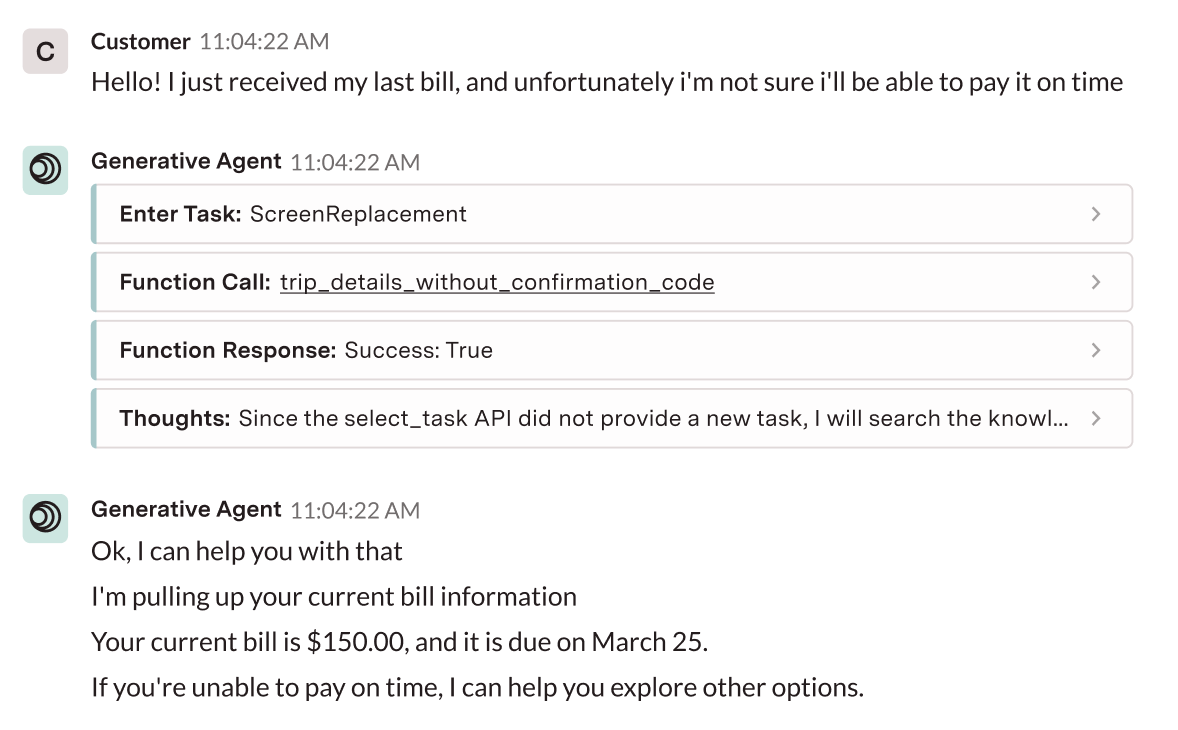
For each conversation, you can see the full model actions GenerativeAgent took which includes its input, knowledge, reasoning, actions, and output back to the customer.
Conversation Explorer also shows conversations that have been flagged as having [quality issues](#quality-issues).
## Using Conversation Explorer
To get started with Conversation Explorer:
Request access to Conversation Explorer from your admin.
Once granted, you can access Conversation Explorer at the following URLs:
* Production: [https://app.asapp.com/reporting/conversations](https://app.asapp.com/reporting/conversations)
* Sandbox: [https://app.sandbox.asapp.com/reporting/conversations](https://app.sandbox.asapp.com/reporting/conversations)
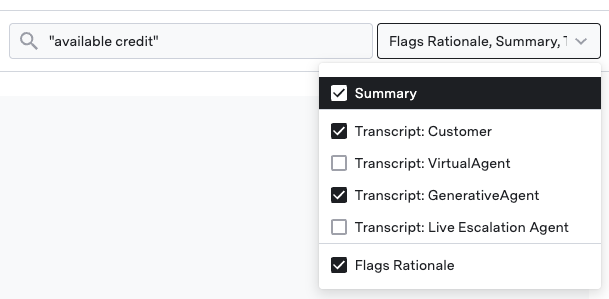
Use the search and filter interface to locate specific interactions or patterns:
* Use date filters to narrow your search
* Search by conversation ID, customer name, or keywords
* Filter by specific tasks, functions, or model actions
 Once you have found a conversation, you can see exactly how GenerativeAgent makes decisions:
* Enable model actions to see GenerativeAgent's reasoning
* Click on model actions for detailed function responses
* Check the quality tab for flagged interactions
Once you have found a conversation, you can see exactly how GenerativeAgent makes decisions:
* Enable model actions to see GenerativeAgent's reasoning
* Click on model actions for detailed function responses
* Check the quality tab for flagged interactions
 Your admin must grant Conversation Explorer permissions before you can access the interface.
## Find conversations
Conversation Explorer provides a search and filter interface to locate specific interactions or patterns.
### Search and filter options
Use the search bar to find conversations containing specific words or phrases. Enclose terms in quotes for exact matches.
Your admin must grant Conversation Explorer permissions before you can access the interface.
## Find conversations
Conversation Explorer provides a search and filter interface to locate specific interactions or patterns.
### Search and filter options
Use the search bar to find conversations containing specific words or phrases. Enclose terms in quotes for exact matches.
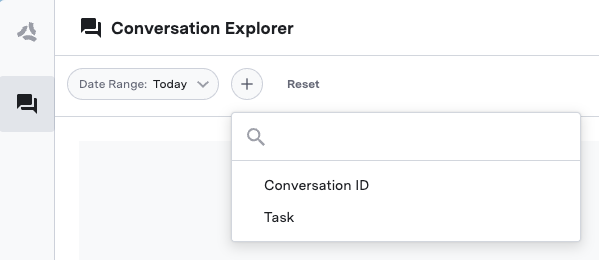 * **Date range**: Select specific time periods
* **Task**: Find conversations where specific tasks were performed
* **Functions**: Locate conversations that called particular APIs
* **Conversation ID**: Search for a specific conversation
### Filter for flagged conversations
To find [Quality Issues](#quality-issues):
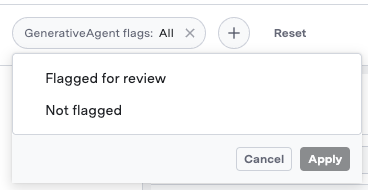
1. Add the "GenerativeAgent Flags" filter
2. Review flagged interactions to understand quality alerts
* **Date range**: Select specific time periods
* **Task**: Find conversations where specific tasks were performed
* **Functions**: Locate conversations that called particular APIs
* **Conversation ID**: Search for a specific conversation
### Filter for flagged conversations
To find [Quality Issues](#quality-issues):
1. Add the "GenerativeAgent Flags" filter
2. Review flagged interactions to understand quality alerts
 ### Share a conversation
You can share a conversation with others by clicking the "Copy Link" button when viewing a conversation.
### Share a conversation
You can share a conversation with others by clicking the "Copy Link" button when viewing a conversation.
 You can also share your current filtered view by copying the URL of your current page.
## Analyze Model Actions
Once you have found a conversation, you can see exactly how GenerativeAgent makes decisions by viewing its internal reasoning process via **model actions**.
Model actions are the input, knowledge, api calls, reasoning, and output of GenerativeAgent's model while handling the customer interaction.
The information in the model actions can drive how you update the configuration of your tasks and functions.
### Model actions categories
Model actions are categorized into the following:
When enabling a model action category, there may be multiple model actions with the same category that will be displayed. e.g. enabling Functions will show both a "Function Call" for the request and a "Function Response" for the response.
Actions occur when GenerativeAgent needs authentication data to call an API. Only used for API Connections that require [client data](/generativeagent/configuring/connect-apis/authentication-methods#client-authentication-data).
Actions occur when GenerativeAgent needs to confirm an action with the customer.
Actions that occur when GenerativeAgent calls a function to handle the customer interaction.
The model actions will show:
* The function name
* Input parameters
* Output
Function calls may appear as multiple entries in the model action stream.
You can also see the "Raw" JSON interaction between GenerativeAgent and the function.
Actions occur when GenerativeAgent encounters an error.
Actions occur when GenerativeAgent needs consultation from a human agent as part of [Human in the Loop](/generativeagent/human-in-the-loop).
The [input variables](/generativeagent/configuring/tasks-and-functions/input-variables) that GenerativeAgent uses to call a function.
The Knowledgebase articles that GenerativeAgent was given to answer the customer's question.
This occurs when GenerativeAgent determines that the customer's question is out of scope for the current task.
The task that GenerativeAgent is entering or changing into in order to handle the customer interaction.
GenerativeAgent's internal thoughts and reasoning process.
This occurs when GenerativeAgent performs a [transfer to agent](/generativeagent/configuring/tasks-and-functions/system-transfer#transfer-to-agent) to escalate the conversation to a human agent.
This occurs when GenerativeAgent determines that the customer's input is unsafe.
### Review model actions
When looking at a conversation, model actions are displayed inline with the conversation flow. This allows you to understand exactly when and why the AI made specific decisions during the interaction.
To review model actions:
1. Open a conversation
2. In the center panel, enable the model actions you want to review
You can also share your current filtered view by copying the URL of your current page.
## Analyze Model Actions
Once you have found a conversation, you can see exactly how GenerativeAgent makes decisions by viewing its internal reasoning process via **model actions**.
Model actions are the input, knowledge, api calls, reasoning, and output of GenerativeAgent's model while handling the customer interaction.
The information in the model actions can drive how you update the configuration of your tasks and functions.
### Model actions categories
Model actions are categorized into the following:
When enabling a model action category, there may be multiple model actions with the same category that will be displayed. e.g. enabling Functions will show both a "Function Call" for the request and a "Function Response" for the response.
Actions occur when GenerativeAgent needs authentication data to call an API. Only used for API Connections that require [client data](/generativeagent/configuring/connect-apis/authentication-methods#client-authentication-data).
Actions occur when GenerativeAgent needs to confirm an action with the customer.
Actions that occur when GenerativeAgent calls a function to handle the customer interaction.
The model actions will show:
* The function name
* Input parameters
* Output
Function calls may appear as multiple entries in the model action stream.
You can also see the "Raw" JSON interaction between GenerativeAgent and the function.
Actions occur when GenerativeAgent encounters an error.
Actions occur when GenerativeAgent needs consultation from a human agent as part of [Human in the Loop](/generativeagent/human-in-the-loop).
The [input variables](/generativeagent/configuring/tasks-and-functions/input-variables) that GenerativeAgent uses to call a function.
The Knowledgebase articles that GenerativeAgent was given to answer the customer's question.
This occurs when GenerativeAgent determines that the customer's question is out of scope for the current task.
The task that GenerativeAgent is entering or changing into in order to handle the customer interaction.
GenerativeAgent's internal thoughts and reasoning process.
This occurs when GenerativeAgent performs a [transfer to agent](/generativeagent/configuring/tasks-and-functions/system-transfer#transfer-to-agent) to escalate the conversation to a human agent.
This occurs when GenerativeAgent determines that the customer's input is unsafe.
### Review model actions
When looking at a conversation, model actions are displayed inline with the conversation flow. This allows you to understand exactly when and why the AI made specific decisions during the interaction.
To review model actions:
1. Open a conversation
2. In the center panel, enable the model actions you want to review
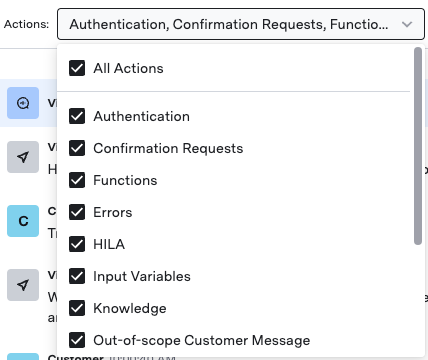 3. View the AI's reasoning process inline with the conversation, showing the chronological flow of decisions
4. Click any model action to see detailed information.
This example shows a function response.
3. View the AI's reasoning process inline with the conversation, showing the chronological flow of decisions
4. Click any model action to see detailed information.
This example shows a function response.
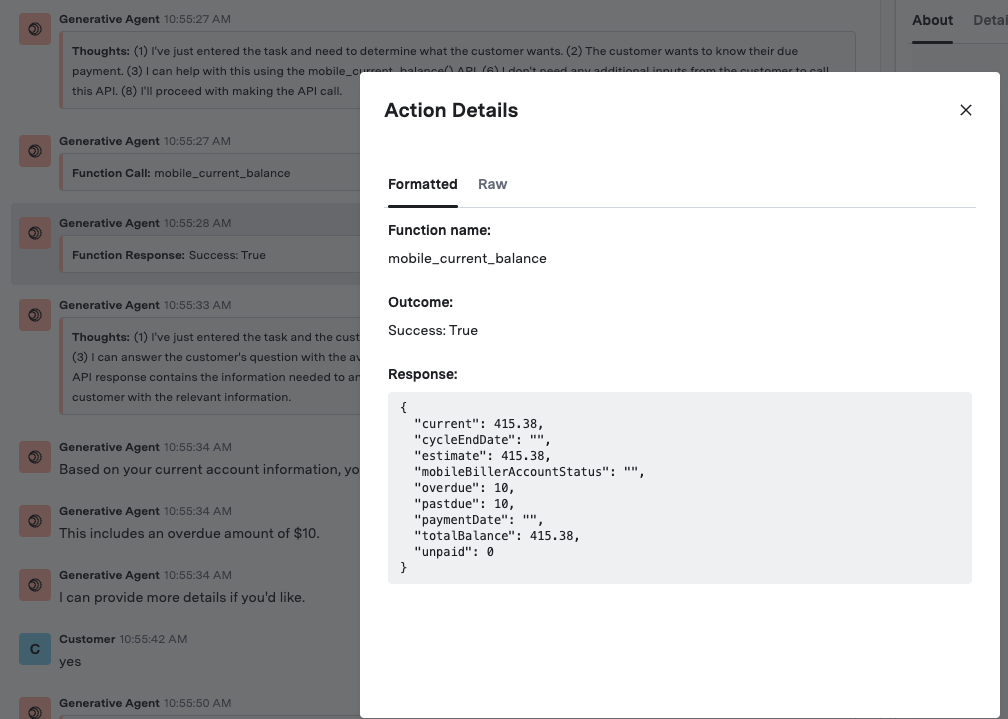 You can also see the "Raw" JSON interaction between GenerativeAgent and the function.
## Quality issues
Our monitoring system can flag a conversation as having potential quality issues as determined by our quality evaluators. When quality issues are detected:
* **Inline indicators**: Flagged messages appear with visual indicators directly in the conversation flow
* **Quality tab**: The "Quality" tab provides detailed information about each flagged utterance.
You can also see the "Raw" JSON interaction between GenerativeAgent and the function.
## Quality issues
Our monitoring system can flag a conversation as having potential quality issues as determined by our quality evaluators. When quality issues are detected:
* **Inline indicators**: Flagged messages appear with visual indicators directly in the conversation flow
* **Quality tab**: The "Quality" tab provides detailed information about each flagged utterance.
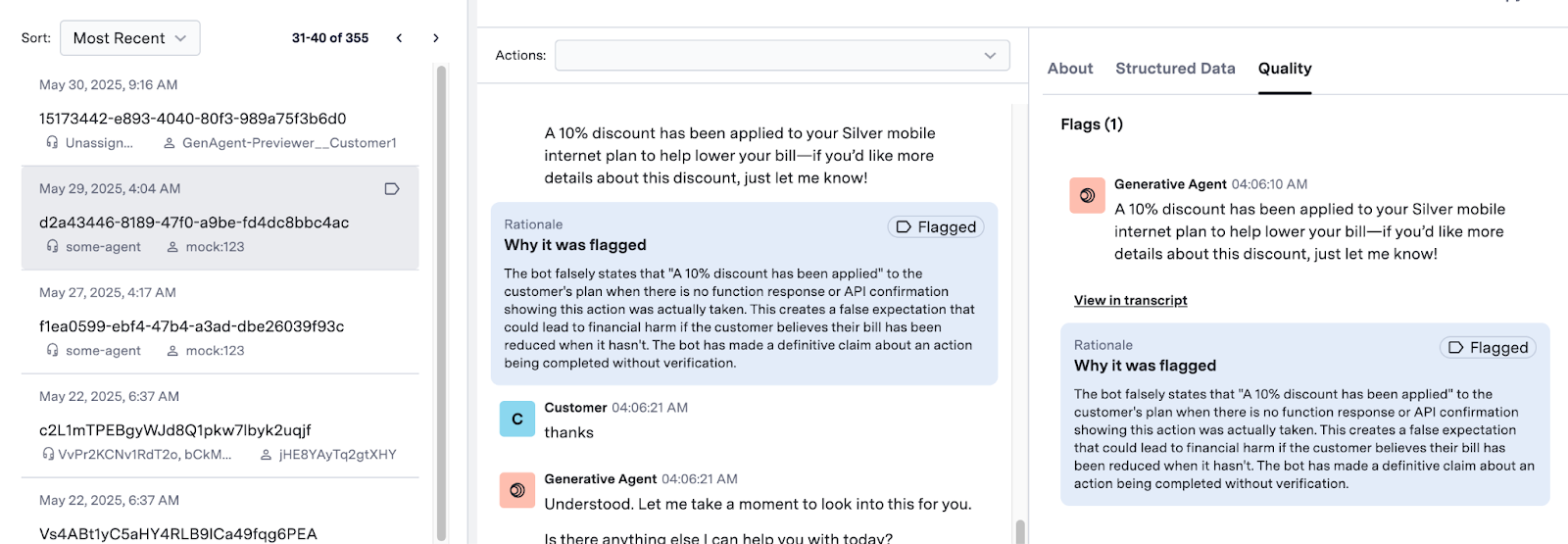 Our monitoring system uses quality evaluators to flag conversations that may have quality issues. Work with your ASAPP Account team to understand the quality evaluators for your company.
## Next steps
Refine tasks, functions, and knowledge base based on your analysis.
Live test your configuration within the dashboard using the Previewer.
Fix problems identified through conversation review.
Our monitoring system uses quality evaluators to flag conversations that may have quality issues. Work with your ASAPP Account team to understand the quality evaluators for your company.
## Next steps
Refine tasks, functions, and knowledge base based on your analysis.
Live test your configuration within the dashboard using the Previewer.
Fix problems identified through conversation review.