> ## Documentation Index
> Fetch the complete documentation index at: https://asapp-04-04-getting-started-ga.mintlify.site/llms.txt
> Use this file to discover all available pages before exploring further.
# Android
 ## Requirements
Chat Instead requires ASAPP Android Chat SDK 8.0.0 or later, and a valid phone number. Before you proceed, make sure you configure it [correctly](/messaging-platform/integrations/android-sdk).
## Phone Formats
Chat Instead accepts a wide variety of formats. See [tools.ietf.org/html/rfc3966](https://tools.ietf.org/html/rfc3966) for the precise definition. For example, it will accept: "+1 (555) 555-5555" and "555-555-5555".
## Getting Started
There are two ways to add Chat Instead. The easiest way is to add the `ASAPPChatInsteadButton` to the layout and call the `ASAPPChatInsteadButton.init`. Alternatively, you can manage the lifecycle yourself.
### 1. Add an ASAPPChatInsteadButton
You can add this button to any layout, like any other [AppCompatButton](https://developer.android.com/reference/androidx/appcompat/widget/AppCompatButton).
```json
```
After that, be sure to call the `ASAPPChatInsteadButton.init` method. Only the phone number is mandatory. Optionally, you can overwrite the `ASAPPChatInsteadButton.onChannel` and the `ASAPPChatInsteadButton.onError` properties of the button.
### 2. Manual Setup of ASAPPChatInstead
1. Initialize Chat Instead
Somewhere after the `ASAPP.init` call:
```json
val chatInstead = ASAPPChatInstead.init(phoneNumber)
```
to initialize Chat Instead. Depending on cache, this will trigger a network call so channels are "immediately" available to the user once the fragment is displayed.
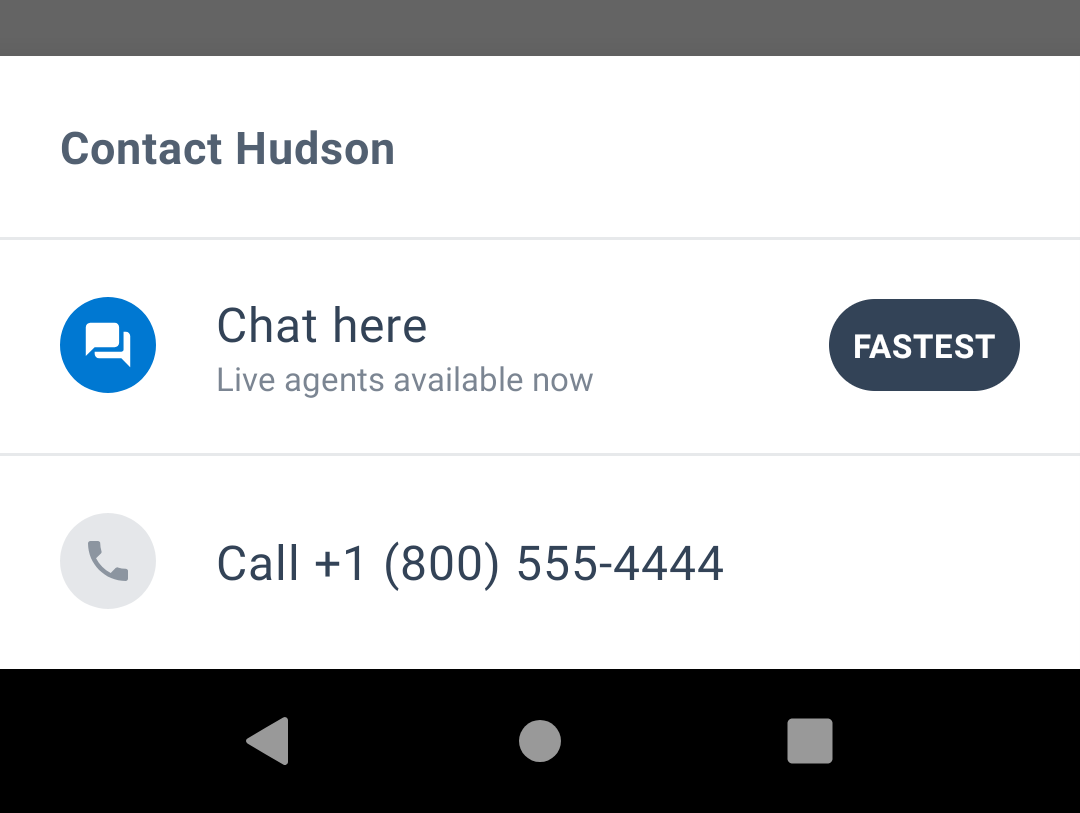
Along with an optional header and a chat icon, you can pass callbacks to be notified when a channel is tapped or an error on a channel happens.
ASAPP makes both callbacks after Chat Instead has tried to act on the tap.
2. Display Channels
With the instance returned by `ASAPPChatInstead.init`, call `ASAPPChatInstead.show` whenever you want to display the [BottomSheetDialogFragment](https://developer.android.com/reference/com/google/android/material/bottomsheet/BottomSheetDialogFragment?hl=en). Depending on cache, this might show a loading state.
3. Clear Chat Instead (optional)
You can interrupt the Chat Instead initial network call, if you call `ASAPPChatInstead.clear`. ASAPP advises you to add the call `onDestroy` for Activities and `onDetachedFromWindow` for Fragments.
If you call `ASAPPChatInstead.clear` after you create the [BottomSheetDialogFragment](https://developer.android.com/reference/com/google/android/material/bottomsheet/BottomSheetDialogFragment?hl=en) view, it will have no effect.
## Error Handling and Debugging
In the case of problems, look for logs with the "ASAPPChatInstead" tag. Be sure to call `ASAPP.setDebugLoggingEnabled(true)` to enable the logs.
Alternatively, you can set callbacks with `ASAPPChatInstead.init`.
### Troubleshoot Chat Instead Errors
#### Crash Caused by UnsupportedOperationException when Displaying the Fragment
This occurs whenever `asapp_primary` is not defined in the style used by the calling Activity. Please refer to **Customization > Colors**.
#### "Unknown Channel" in the Log or the onError Callback
Talk to your Implementation Manager at ASAPP. ASAPP's Backend sent a channel we don't know how to handle. You might need to upgrade the Android SDK version.
#### "Unknown Error" in the Log
Talk to your Implementation Manager at ASAPP. This might be a bug. Please attach logs and reproduction steps.
#### "Activity Context Not Found" in the Log
It means you are not sending the right context at `ASAPPChatInstead.show`.
## Tablet and Landscape Support
Chat Instead supports these configurations seamlessly.
## Customization
## Requirements
Chat Instead requires ASAPP Android Chat SDK 8.0.0 or later, and a valid phone number. Before you proceed, make sure you configure it [correctly](/messaging-platform/integrations/android-sdk).
## Phone Formats
Chat Instead accepts a wide variety of formats. See [tools.ietf.org/html/rfc3966](https://tools.ietf.org/html/rfc3966) for the precise definition. For example, it will accept: "+1 (555) 555-5555" and "555-555-5555".
## Getting Started
There are two ways to add Chat Instead. The easiest way is to add the `ASAPPChatInsteadButton` to the layout and call the `ASAPPChatInsteadButton.init`. Alternatively, you can manage the lifecycle yourself.
### 1. Add an ASAPPChatInsteadButton
You can add this button to any layout, like any other [AppCompatButton](https://developer.android.com/reference/androidx/appcompat/widget/AppCompatButton).
```json
```
After that, be sure to call the `ASAPPChatInsteadButton.init` method. Only the phone number is mandatory. Optionally, you can overwrite the `ASAPPChatInsteadButton.onChannel` and the `ASAPPChatInsteadButton.onError` properties of the button.
### 2. Manual Setup of ASAPPChatInstead
1. Initialize Chat Instead
Somewhere after the `ASAPP.init` call:
```json
val chatInstead = ASAPPChatInstead.init(phoneNumber)
```
to initialize Chat Instead. Depending on cache, this will trigger a network call so channels are "immediately" available to the user once the fragment is displayed.
Along with an optional header and a chat icon, you can pass callbacks to be notified when a channel is tapped or an error on a channel happens.
ASAPP makes both callbacks after Chat Instead has tried to act on the tap.
2. Display Channels
With the instance returned by `ASAPPChatInstead.init`, call `ASAPPChatInstead.show` whenever you want to display the [BottomSheetDialogFragment](https://developer.android.com/reference/com/google/android/material/bottomsheet/BottomSheetDialogFragment?hl=en). Depending on cache, this might show a loading state.
3. Clear Chat Instead (optional)
You can interrupt the Chat Instead initial network call, if you call `ASAPPChatInstead.clear`. ASAPP advises you to add the call `onDestroy` for Activities and `onDetachedFromWindow` for Fragments.
If you call `ASAPPChatInstead.clear` after you create the [BottomSheetDialogFragment](https://developer.android.com/reference/com/google/android/material/bottomsheet/BottomSheetDialogFragment?hl=en) view, it will have no effect.
## Error Handling and Debugging
In the case of problems, look for logs with the "ASAPPChatInstead" tag. Be sure to call `ASAPP.setDebugLoggingEnabled(true)` to enable the logs.
Alternatively, you can set callbacks with `ASAPPChatInstead.init`.
### Troubleshoot Chat Instead Errors
#### Crash Caused by UnsupportedOperationException when Displaying the Fragment
This occurs whenever `asapp_primary` is not defined in the style used by the calling Activity. Please refer to **Customization > Colors**.
#### "Unknown Channel" in the Log or the onError Callback
Talk to your Implementation Manager at ASAPP. ASAPP's Backend sent a channel we don't know how to handle. You might need to upgrade the Android SDK version.
#### "Unknown Error" in the Log
Talk to your Implementation Manager at ASAPP. This might be a bug. Please attach logs and reproduction steps.
#### "Activity Context Not Found" in the Log
It means you are not sending the right context at `ASAPPChatInstead.show`.
## Tablet and Landscape Support
Chat Instead supports these configurations seamlessly.
## Customization
 ### Header
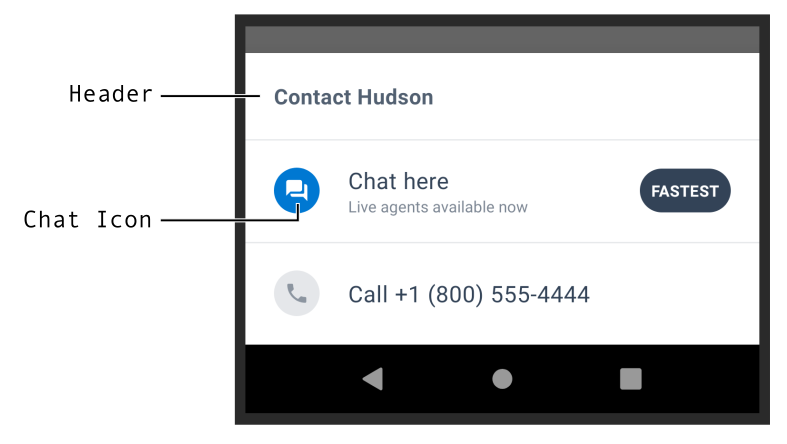
By default it will use the text in `R.string.asapp_chat_instead_default_header`. You can send a different string when initializing Chat Instead, but it's important to know the ASAPP Backend will overwrite it if the call is successful.
### Chat Icon
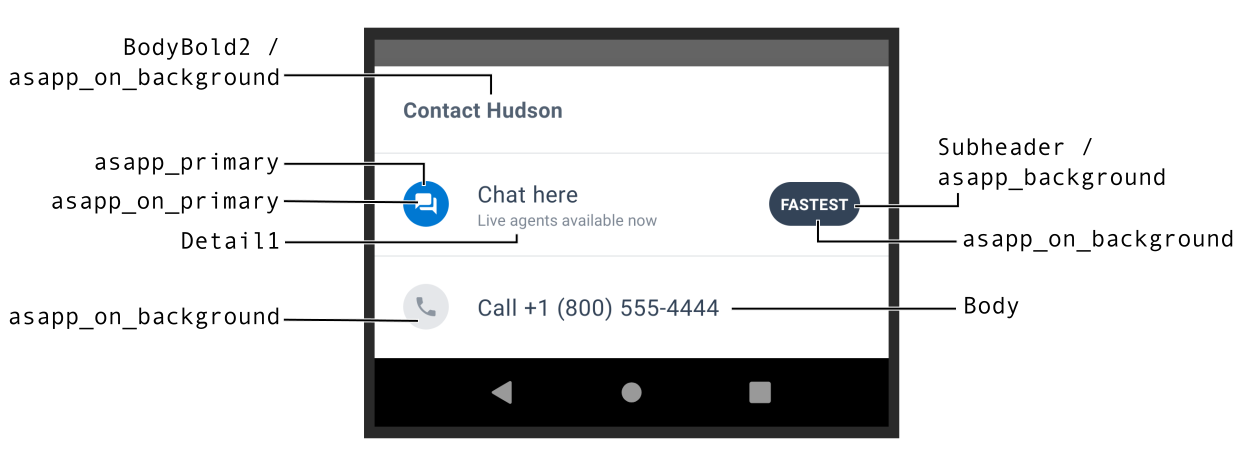
You can customize the SDK Chat channel icon. By default it will be tinted with `asapp_primary` and `asapp_on_primary`.
If you customize the icon, make sure to test how it looks in Night Mode (a.k.a. Dark Mode).
### Colors
Chat Instead uses the ASAPP text styles and colors. For more information on how to customize, go to [Customization](../android-sdk/customization "Customization").
### Header
By default it will use the text in `R.string.asapp_chat_instead_default_header`. You can send a different string when initializing Chat Instead, but it's important to know the ASAPP Backend will overwrite it if the call is successful.
### Chat Icon
You can customize the SDK Chat channel icon. By default it will be tinted with `asapp_primary` and `asapp_on_primary`.
If you customize the icon, make sure to test how it looks in Night Mode (a.k.a. Dark Mode).
### Colors
Chat Instead uses the ASAPP text styles and colors. For more information on how to customize, go to [Customization](../android-sdk/customization "Customization").
 ## Remote settings
Chat Instead receives configuration information from ASAPP's Backend (BE), in addition to the channels to display. The configuration enables/disables the feature and selects the device type (mobile, tablet, none). Contact your Implementation Manager at ASAPP if you have any questions.
It's important to know how the BE affects customization. If you provide a header, the BE will overwrite it. On the other hand, the BE cannot overwrite the phone number.
## Cache
Chat Instead will temporarily cache the displayed channels to provide a better user experience. The cache is warmed at instantiation. The information will persist through phone restarts. As usual, it won't survive an uninstall or a "clear cache" in App info.
## Remote settings
Chat Instead receives configuration information from ASAPP's Backend (BE), in addition to the channels to display. The configuration enables/disables the feature and selects the device type (mobile, tablet, none). Contact your Implementation Manager at ASAPP if you have any questions.
It's important to know how the BE affects customization. If you provide a header, the BE will overwrite it. On the other hand, the BE cannot overwrite the phone number.
## Cache
Chat Instead will temporarily cache the displayed channels to provide a better user experience. The cache is warmed at instantiation. The information will persist through phone restarts. As usual, it won't survive an uninstall or a "clear cache" in App info.